Manual Task Lists Can Be Missed
Sticky notes, spreadsheets, verbal reminders, and separate lists can create missed follow-ups and unclear ownership.
EMR-EHRs Task Management Feature helps healthcare practices create patient-linked tasks, assign staff owners, manage provider and staff worklists, track due dates, priorities, overdue items, completion history, and secure task records where supported.
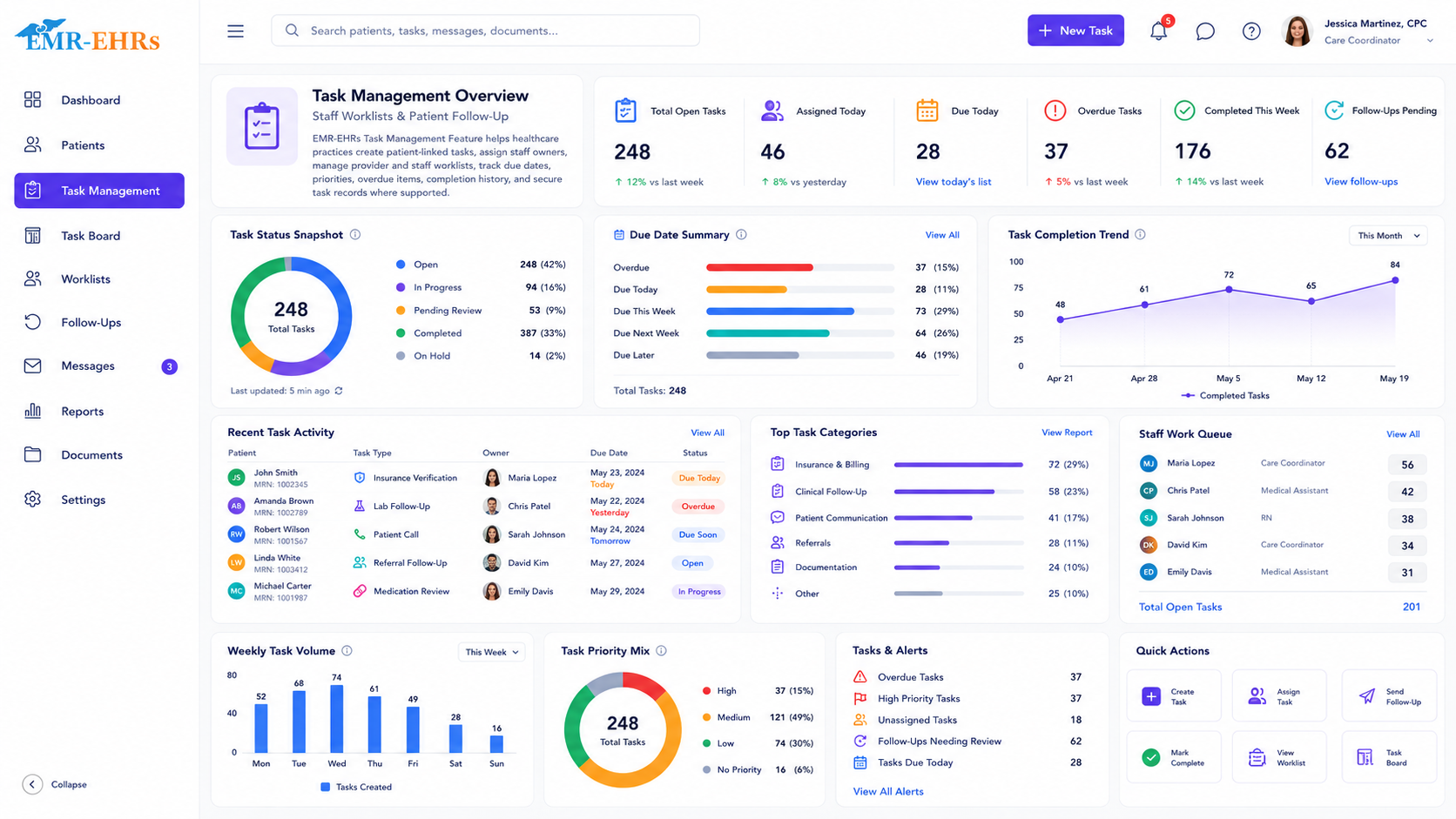
The EMR-EHRs Task Management Feature helps healthcare practices create, assign, track, and complete patient-linked tasks, staff worklists, provider tasks, follow-up items, due dates, priorities, statuses, and secure task history where supported.
EMR-EHRs Task Management Feature helps teams keep patient follow-up work visible, assigned, trackable, and connected to the EMR workflow.
Sticky notes, spreadsheets, verbal reminders, and separate lists can create missed follow-ups and unclear ownership.
Teams need to know who owns each callback, form, document, lab follow-up, appointment task, or billing item.
Unfinished tasks should remain visible by due date, priority, owner, patient, category, and status where supported.
Completion notes, staff actions, reassignment, status changes, and task history should stay connected to patient records where supported.
A provider or staff member creates a patient task, follow-up item, worklist task, callback, document task, or administrative item.
The user adds task category, message, patient context, related workflow, notes, or instructions.
The task receives a due date, priority, urgency, reminder status, or escalation level where supported.
The task is assigned to a provider, staff member, billing team, front desk team, administrator, or shared queue where supported.
The task appears in provider worklists, staff queues, patient chart views, dashboards, or reports where supported.
Users update status, add completion notes, reassign, defer, escalate, or close the task while history is saved where supported.
Designed to support secure patient task workflows, role-based task permissions, and audit-friendly task activity records where supported.
Review patient follow-up tasks, chart review items, clinical worklists, and overdue items where supported.
Manage callbacks, lab follow-ups, document tasks, care reminders, and patient communication tasks.
Track appointment tasks, form requests, patient calls, check-in items, and scheduling follow-ups.
Manage billing reminders, insurance tasks, claim follow-up, document requests, and patient account tasks where supported.
Monitor staff worklists, overdue tasks, completion trends, task volume, and reports.
Standardize task categories, ownership, due dates, priorities, and reports across providers.
The EMR-EHRs Task Management Feature helps healthcare practices create, assign, track, and complete patient-linked tasks, staff worklists, provider tasks, follow-up items, due dates, priorities, and secure task history where supported.
Tasks can be assigned to providers, clinical staff, front desk teams, billing teams, care coordinators, administrators, or team queues where supported.
Yes, where supported. Teams can track pending, active, in-progress, completed, deferred, reassigned, escalated, and overdue tasks.
Yes, where supported. Tasks can stay connected to the patient chart, related notes, follow-up requirements, documents, appointments, labs, billing items, or patient communication history.
It gives teams clearer ownership, due dates, worklists, overdue visibility, completion history, and reports so follow-up work is easier to monitor and close.
Create patient tasks, assign owners, track due dates, manage worklists, monitor overdue items, and maintain secure task history with the EMR-EHRs Task Management Feature where supported.
Phone: (480) 782-1116 | Email: [email protected]
Customer Experiences
Read customer feedback about EMR implementation, practice management workflows, billing, training, support, documentation, scheduling, and daily medical office operations.
Read full testimonialHello my name is Sarah and I wanted to take a minute and tell you about my experience implementing a Podiatry EMR program. We researched for about 18 months and in doing so looked at over 20 different EMR programs. We recently went live with IMS through 1st Providers Choice and were completely thrilled that during the first two months of the transition of going paperless, we showed an increase in productivity even during training and the implementation process. The more we are in the software, the more we find that it has so many capabilities to be efficient for my doctors, my billing coordinator, and the front desk. Support has been good, there were a few occasions where we needed things off business hours, and even then 1st Providers Choice was there for us. We were glad we took our time and looked at several programs before making a decision.
Read full testimonialWe began implementing IMS in our office in April of 2011. This transition was made exceptionally easy with the help of 1st Providers Choice support staff. 1st Providers Choice support staff was quick to respond to all of our support needs during implementation and with any of our current support needs. We were uncertain and a little skeptical about bringing the billing in house because I had never done billing before. Our office was able to bring billing in house during this time of implementing IMS and our revenue is up and our turnaround time is quicker than ever before. We are happy that we decided to go with 1st Providers Choice and made the transition to utilizing IMS for Podiatry.
Read full testimonialChoosing 1st Providers Choice as a business partner has been an excellent choice for our office. We received extensive training from the educational team and find the program to be very user friendly. Scheduling is easy and our billing process has been greatly expedited. The EHR part of the program is easy to work, saves time and helps prevent errors. We have successfully implemented the built-in fax and camera features. 1st Providers Choice is a progressive company that keeps up-to-date on laws and changes and offers excellent support. Thanks, 1st Providers Choice, for helping our office run more efficiently. We really like this program.
Read full testimonialMy bad-debt write-offs have been reduced over 90%. Pre-IMS, we had an average of $80,000 per month outstanding in charges waiting for referral. Since implementation of IMS we now regularly maintain no more than $400 per month. The Authorization tracking screen helps us in timely follow-up with the insurance companies. The billing module is great, in a way we now know what ensures timely payments. The aging reports help our billers set priority of follow-ups, making sure we work in the right areas.
Read full testimonialI just wanted to say that I love IMS!!! We have had other programs in the past but IMS is super!!!! I can bill out charges, enter patient demographics, print patient statements and read the patient ledger much easier. My favorite part of IMS is the billing part. It is so easy to read!!!! Makes my job easier!!!! Thank You!!!
Read full testimonialIMS has improved the billing payment turnaround time. The denied claims have been reduced drastically. The implementation process was smooth and the system is very user friendly.