Incomplete patient intake
Missing demographics, medication histories, allergies and insurance details can interrupt clinical and administrative workflows.
Manage clinical documentation, patient records, prescribing, follow-up and practice administration with connected electronic medical record workflows.
EMR-EHRs offers clinical and practice management functionality that healthcare organizations can evaluate for outpatient acute care requirements.
Review how the system handles patient intake, clinical charting, medication information, laboratory workflows, scheduling and medical billing.
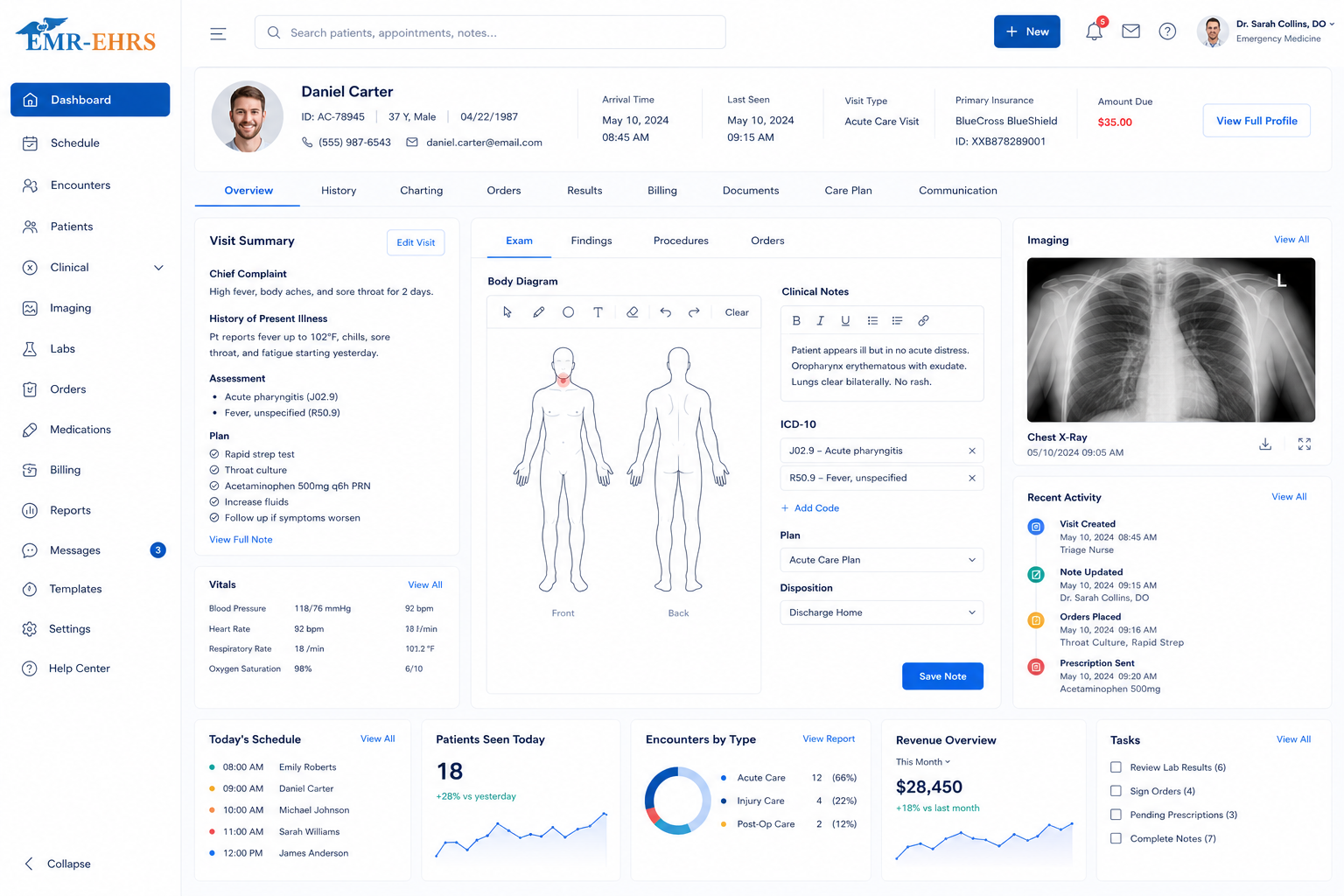
Acute care EMR software helps clinicians document and manage patient information associated with short-term illnesses, injuries and other acute episodes of care. Depending on the organization and available software modules, it may support intake, assessment, clinical notes, orders, medications, results, discharge instructions, follow-up and billing.
Acute care includes different healthcare environments, from outpatient same-day visits to hospital-based treatment. Their software requirements are not identical.
This page focuses on outpatient and practice-based acute care workflows. Hospital organizations requiring emergency department, inpatient admission, bed management or other hospital information system functionality should review those requirements separately.
Electronic medical records (EMRs) generally manage patient records within a healthcare organization. Electronic health records (EHRs) can support broader patient information exchange and longitudinal records.
Healthcare teams need timely access to patient information, clear documentation and reliable coordination between clinical and administrative staff.
Missing demographics, medication histories, allergies and insurance details can interrupt clinical and administrative workflows.
Clinicians must document relevant history, findings, assessments and treatment decisions during busy outpatient encounters.
Laboratory and diagnostic results require timely review, assigned responsibilities and appropriate follow-up.
Prescribing requires appropriate access to medication histories, allergies, clinical information and pharmacy workflows.
Patients need clear instructions regarding treatment, medication, follow-up, warning symptoms and when to seek further care.
Accurate claims depend on documented services, appropriate coding and relevant payer requirements.
A practical outpatient acute care workflow connects information across clinical and administrative responsibilities.
Record demographics, insurance information, chief complaint and relevant patient details.
Document symptoms, history, vital signs, examination findings and observations.
Record assessment, diagnoses, care decisions and treatment plans.
Manage applicable medication, laboratory and diagnostic workflows.
Review available results and document required follow-up actions.
Record treatment guidance, return precautions and recommended next steps.
Arrange relevant follow-up visits, referrals and communication.
Connect encounter documentation with claims and administrative reporting.
Explore the related EMR-EHRs clinical and practice management solutions and assess how each supports your needs.
Maintain patient histories, encounter information, medications and clinical records.
Explore patient chartsSupport registration, patient forms and administrative check-in.
Explore check-inReview available prescribing workflows, pharmacy connections and medication information.
Explore e-prescribingEvaluate laboratory order workflows, results access and follow-up processes.
Explore lab trackingOrganize notes, administrative tasks, reminders and clinical communication.
Explore remindersReview digital communication and patient information management options.
Explore patient portalOrganize relevant documents, outside records and clinical information.
Document managementReview scheduling, billing and other administrative workflows.
Practice managementEvaluate available operational and financial reporting capabilities.
Reports managementClinical documentation should reflect the actual findings, services and treatment decisions for each encounter.
Common documentation areas include:
Depending on the visit, documentation may include:
Relevant documentation may include:
Prescribing workflows should make relevant clinical information accessible during treatment decisions.
Important evaluation areas include:
Healthcare organizations should define how they receive, review and act on test results.
Effective revenue cycle processes depend on accurate documentation, appropriate coding, claims preparation and payment management.
Review insurance information and eligibility processes for applicable patient visits.
Eligibility verificationEvaluate tools that support coding activities and connection to clinical documentation.
CPT coding advisorManage electronic claims according to the practice's configured billing workflow.
Claims processingEvaluate claim checks that identify certain missing or inconsistent billing information.
Claim scrubbingReview workflows for recording and reconciling payments.
Payment postingReview outstanding balances and available accounts receivable management functionality.
Medical billing and collectionsHealthcare organizations often rely on external laboratories, pharmacies, imaging systems, referral partners and clearinghouses.
Confirm supported laboratories, order transmission and results delivery.
Evaluate report access, imaging integrations and relevant interface requirements.
Confirm electronic prescribing capabilities, pharmacy connections and prescribing requirements.
Review payer connectivity, electronic claims and remittance processing.
Assess imported clinical documents, referrals and relevant record exchange.
Plan historical data transfer, mapping, reconciliation and record validation.
Data migration servicesAI tools may help with documentation and selected administrative activities, but their actual capabilities vary by product and implementation.
Ask whether the software can prepare draft notes from appropriate patient encounter information.
Evaluate clinician review, editing, approval and error handling.
Evaluate whether available tools can summarize documented patient information.
Assess factual accuracy, completeness and source traceability.
Review available assistance for administrative drafts, information organization and routine workflows.
Confirm data protection and human oversight.
These are evaluation considerations, not confirmation that every AI function is available in the Acute Care product.
Accessible patient records, encounter documentation, medication information, clinical results and treatment plans.
Intake documentation, patient observations, clinical task information and coordinated handoffs.
Registration, scheduling, insurance information and patient communication.
Staff permissions, scheduling, reporting and operational information.
Coding information, claims, payments, outstanding balances and financial reporting.
Security controls, integrations, data migration, deployment and vendor support.
A general-purpose EMR may already support acute care encounters. Compare the actual workflows rather than relying on labels alone.
| Area | What to evaluate | Why it matters |
|---|---|---|
| Patient intake | Demographics, history, medications, allergies and vitals | Completeness of encounter information |
| Documentation | Templates, customization and note signing | Accurate clinical record keeping |
| Results | Availability, review and follow-up | Clinical coordination |
| Prescribing | Medication data, allergies and pharmacy connections | Medication workflow support |
| Patient communication | Instructions, portal and follow-up processes | Continuity after the visit |
| Medical billing | Coding, claims and payment workflows | Administrative coordination |
| Security | Access controls, audit records and vendor practices | Protection of patient information |
Define baseline measurements before implementation and evaluate changes after staff training and workflow stabilization.
Healthcare organizations should assess vendor safeguards alongside their own policies and legal responsibilities.
Reference: HHS HIPAA Security Rule .
Implementation requires coordinated decisions about workflows, migration, training and operational readiness.
Document current clinical and administrative requirements.
Identify required roles, templates, settings and billing workflows.
Plan extraction, mapping, validation and reconciliation.
Prepare role-based training for clinical and administrative staff.
Review essential workflows and support arrangements.
Monitor adoption, open issues and required improvements.
Use these questions to assess whether the proposed system meets your organization's actual requirements.
Demo recommendation: Request a realistic walkthrough using fictional patient data, from registration to documentation, prescribing, follow-up and billing. Ask the vendor to distinguish native features, integrations, configuration work and unavailable functionality.
Acute care EMR software is used to document and manage information related to short-term illness, injury and other acute episodes. Its available functions depend on the system and care setting.
No. Urgent care is a specific outpatient healthcare setting. Acute care is a broader category involving short-term treatment in different clinical environments.
Explore urgent care EMR software for more targeted urgent care requirements.
Common requirements include patient records, clinical documentation, medication management, relevant order and results workflows, patient instructions, follow-up processes, security controls and administrative functionality.
Many EHR systems provide laboratory and diagnostic functionality, but integrations differ. Confirm supported vendors, interfaces, order workflows and results access before purchasing.
EMR-EHRs describes practice management functions including claims, eligibility verification, medical billing and payment posting. Confirm included modules and interfaces in your proposal.
EMR-EHRs has an AI-powered EMR solutions page. Buyers should request a demonstration of currently available AI functions, review requirements, privacy controls and pricing.
This page does not establish that EMR-EHRs provides a complete hospital information system. Hospital-specific modules and integrations require separate product confirmation.
No. Compliance depends on applicable legal responsibilities, organizational safeguards, workforce practices and vendor arrangements. Software alone cannot guarantee compliance.
Data migration depends on the source system, available exports, data quality and implementation scope. Discuss migration requirements before establishing the project plan.
Pricing depends on the required modules, provider count, integrations, migration and support arrangements. Request a personalized proposal based on your organization.
Visit the contact page or call (480) 782-1116 .