Chiropractic EHR Software

Chiropractic EHR Software Built for SOAP Notes, Billing, and Patient Care

EMR-EHRs provides chiropractic EHR software designed to help chiropractic practices manage SOAP notes, digital intake, initial exams, treatment plans, spinal adjustment documentation, re-exams, outcomes tracking, scheduling, billing, patient communication, and secure records from one connected system.
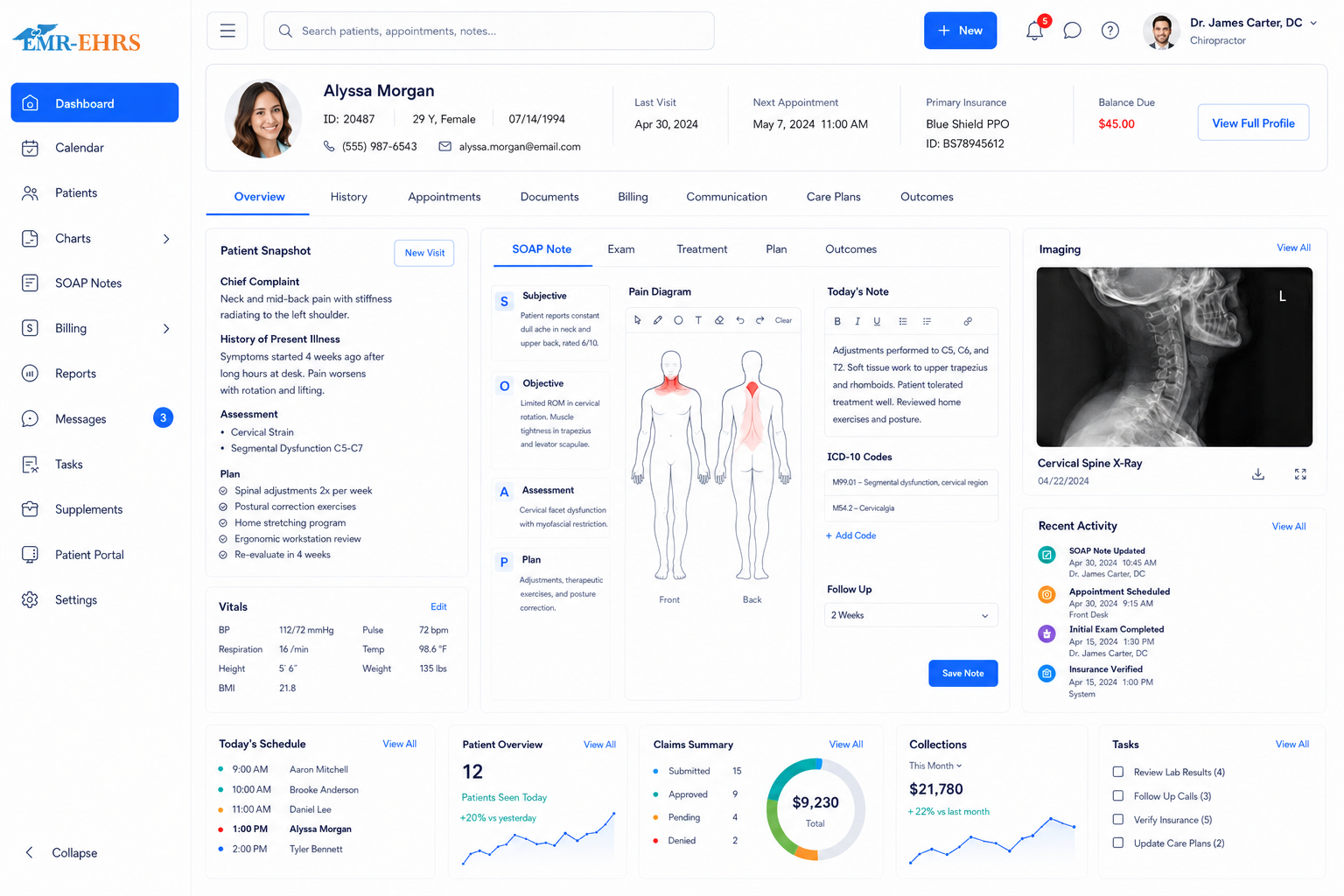
Chiropractic EHR dashboard preview
Chiropractic workflow-focused EHRSOAP notes and treatment plansDigital intake and check-inScheduling and billing integrationPatient portal supportRole-based accessPowered by EMR-EHRs
Quick answer

What Is Chiropractic EHR Software?

Chiropractic EHR software is a digital record system designed for chiropractic practices. It helps chiropractors manage SOAP notes, patient intake, initial exams, spinal adjustment documentation, treatment plans, re-exams, outcomes tracking, scheduling, billing, insurance workflows, patient communication, and secure patient records.

Chiropractic EHR Software for Every Practice Type

Solo Chiropractors

EMR-EHRs helps solo chiropractors manage scheduling, SOAP notes, treatment plans, billing, patient reminders, and secure records without unnecessary complexity.

Multi-Provider Chiropractic Clinics

EMR-EHRs supports provider calendars, documentation, patient status, billing workflows, permissions, and reporting across multiple chiropractors and staff members.

Multi-Location Chiropractic Practices

EMR-EHRs helps growing chiropractic groups manage centralized scheduling, location-level reports, provider productivity, staff permissions, and consistent documentation.

Personal Injury and Auto Accident Chiropractic Practices

EMR-EHRs supports injury history, auto accident questionnaires, imaging attachments, treatment plans, narrative reports, attorney/insurance documentation, and billing workflows.

Workers’ Compensation Chiropractic Practices

EMR-EHRs supports work injury documentation, work status forms, work restriction templates, visit history, progress notes, and claim documentation.

Sports Chiropractic Practices

EMR-EHRs helps track injury details, range of motion, functional limitations, treatment progress, rehab notes, and return-to-activity documentation.

Family and Wellness Chiropractic Clinics

EMR-EHRs supports recurring visits, wellness care plans, patient education, reminders, recalls, and family record management.

Why Chiropractic Practices Need Specialty-Specific EHR Software

EMR-EHRs is built as a chiropractic workflow solution, not just a general EHR system with chiropractic labels.

Chiropractic care is visit-heavy and documentation-heavy
SOAP notes must be fast, structured, and consistent
Adjustments, modalities, ROM, pain levels, and functional progress need clear documentation
Initial exams and re-exams need different templates
Treatment plans require visit frequency, goals, care phases, and progress tracking
Billing and coding must connect with completed documentation
Personal injury, auto accident, and workers’ compensation cases need stronger records
Recalls and reminders help practices reduce missed visits and support ongoing care
Generic EHR systems often do not match chiropractic documentation workflows

Manage the Complete Chiropractic Workflow From Intake to Follow-Up

Step 1: Appointment Scheduling

  • Provider calendar
  • Visit type selection
  • New patient appointments
  • Recurring visits
  • Waitlist management
  • Appointment reminders
  • No-show tracking
  • Same-day schedule view

Step 2: Digital Intake and Check-In

  • New patient forms
  • Medical history
  • Pain complaint details
  • Injury history
  • Auto accident questionnaire
  • Workers’ compensation forms
  • Insurance information
  • Consent forms
  • Check-in status

Step 3: Initial Exam

  • Chief complaint
  • Pain location
  • Pain scale
  • Injury history
  • Range of motion
  • Orthopedic exam findings
  • Neurological exam findings
  • Palpation findings
  • Diagnosis documentation
  • Imaging attachments

Step 4: Chiropractic SOAP Notes

  • Subjective complaints
  • Objective findings
  • Assessment
  • Plan
  • Adjustment documentation
  • Modalities used
  • Provider notes
  • Chart completion status
  • Provider signature

Step 5: Adjustment, Modality, and Therapy Documentation

  • Spinal regions treated
  • Extremity adjustments
  • Adjustment technique
  • Manual therapy
  • Therapeutic exercise
  • Electrical stimulation
  • Ultrasound therapy
  • Heat/ice therapy
  • Rehab activity notes
  • Home exercise plan

Step 6: Treatment Plan and Care Plan Tracking

  • Visit frequency
  • Treatment goals
  • Care phases
  • Recommended services
  • Re-exam date
  • Patient education
  • Progress tracking
  • Updated care plan
  • Discharge planning

Step 7: Re-Exam and Outcomes Tracking

  • Pain score comparison
  • Range of motion updates
  • Functional status changes
  • Outcome measures
  • Treatment response
  • Medical necessity documentation
  • Updated care plan
  • Progress reports

Step 8: Billing and Claim Readiness

  • CPT coding support
  • ICD coding support
  • Superbill creation
  • Insurance eligibility
  • Claim submission support
  • Payment posting
  • Denial tracking
  • Billing reports
  • Documentation-to-claim workflow

Step 9: Follow-Up and Patient Retention

  • Appointment reminders
  • Missed appointment follow-up
  • Recall campaigns
  • Re-exam reminders
  • Care plan reminders
  • Patient portal messages
  • Home exercise instructions
  • Review request workflow

Chiropractic SOAP Notes Software for Faster Visit Documentation

EMR-EHRs supports faster, cleaner, and more complete SOAP documentation for daily chiropractic visits.

Chiropractic-specific SOAP note templates
Subjective pain and complaint documentation
Objective exam findings
Assessment and diagnosis documentation
Treatment plan documentation
Adjustment and modality notes
Visit-to-visit note copying with review
Provider signature
Chart completion status
Narrative note output where needed

Digital Intake and Chiropractic Patient Check-In

Digital intake helps reduce front-desk workload and prepares providers before the visit begins.

Online intake forms
New patient forms
Medical history forms
Pain complaint forms
Injury history forms
Auto accident questionnaire
Workers’ compensation forms
Consent forms
Insurance forms
Patient kiosk/check-in support
Demographic updates
Form completion alerts
Document upload

Initial Exam and Chiropractic Evaluation Documentation

Chief complaint
Injury and complaint history
Pain scale
Pain location
Range of motion
Palpation
Orthopedic exam findings
Neurological exam findings
Muscle testing
Neurovascular exam findings
Diagnosis documentation
Imaging and document attachments

Chiropractic Treatment Plan and Care Plan Tracking

Treatment plan creation
Visit frequency
Treatment goals
Care phases
Recommended services
Re-exam schedule
Patient education
Treatment progress
Updated plan of care
Discharge planning

Document Adjustments, Modalities, and Chiropractic Treatments

Spinal adjustment documentation
Extremity adjustment documentation
Adjustment technique
Regions treated
Manual therapy
Therapeutic exercise
Electrical stimulation
Ultrasound therapy
Heat/ice therapy
Rehab activity notes
Home exercise plan documentation

Re-Exam, Outcomes, and Progress Tracking

Re-exam reminders
Pain score comparison
Range of motion progress
Functional status tracking
Treatment response
Outcome measures
Medical necessity documentation
Updated care plan
Progress reports
Discharge readiness

Chiropractic Scheduling Software for Busy Practices

Appointment calendar
Provider scheduling
Recurring visits
Visit type scheduling
Room/resource scheduling
Patient reminders
Waitlist support
Missed appointment follow-up
Online appointment requests
Same-day schedule view

Chiropractic Billing and Coding Software for Cleaner Claims

CPT coding support
ICD coding support
Superbill creation
Insurance eligibility verification
Claim submission support
Claim status tracking
Payment posting
Denial management
Patient responsibility tracking
Billing reports
Documentation-to-claim workflow
CMS-1500 support where applicable

Insurance, Personal Injury, and Workers’ Compensation Documentation Support

Insurance eligibility
Prior authorization tracking where needed
Injury history documentation
Auto accident questionnaire
Workers’ compensation forms
Work restriction templates
Work status templates
Visit history
Imaging/document attachments
Narrative reports
Attorney/insurance documentation
Claim documentation support
Audit-ready records

Patient Portal for Scheduling, Forms, Messages, and Follow-Up

A patient portal helps chiropractic practices reduce manual front-desk work by allowing patients to request appointments, complete intake forms, update information, receive reminders, access instructions, communicate securely, and stay engaged with their care plan.

Online appointment requests
Intake form completion
Demographic updates
Insurance updates
Secure messaging
Home exercise instructions
Visit reminders
Follow-up reminders
Payment access
Patient education

Patient Retention, Recall, and Care Plan Follow-Up Tools

Automated reminders
Missed appointment follow-up
Recall campaigns
Re-exam reminders
Care plan reminders
Lapsed patient follow-up
Patient education messages
Review request workflows

Chiropractic Outcomes Tracking and Practice Reporting

Pain score reports
Range of motion progress
Functional status tracking
Visit volume reports
Provider productivity
Patient retention reports
No-show reports
Claim and denial reports
Revenue reports
Care plan progress reports
Dashboard views

AI-Powered Features That Help Chiropractors Document Faster

AI-powered features are designed to support documentation efficiency and workflow review. Final clinical decisions and final documentation remain under provider control.

AI-assisted SOAP note suggestions
Smart patient history summaries
Missing documentation alerts
Treatment plan prompts
Re-exam reminder suggestions
Coding-support prompts
Patient message assistance
Chart review support
Follow-up task suggestions

Generic EHR vs Chiropractic-Specific EHR Software

AreaGeneric EHREMR-EHRs Chiropractic EHR
Main workflowGeneral medical visitsIntake, SOAP notes, adjustments, treatment plans, re-exams
DocumentationGeneral notesSOAP notes, exams, modalities, care plans, PI documentation
Treatment trackingLimitedVisit frequency, care phases, progress, re-exams
OutcomesBasic notesPain score, ROM, functional status, progress tracking
BillingStandard claimsChiropractic CPT/ICD workflow and claim readiness
Patient engagementBasic portalReminders, recalls, missed visit follow-up, care plan messages
ReportingGeneral reportsVisit volume, productivity, retention, outcomes, billing

What to Look for in Chiropractic EHR Software

Chiropractic SOAP note templates
Digital intake and patient check-in
Initial exam templates
Re-exam documentation
Pain scale and outcome tracking
Range of motion documentation
Treatment plan and care plan tracking
Adjustment and modality documentation
Personal injury and workers’ compensation documentation
Narrative report support
Scheduling and recurring visit support
Patient reminders and recall tools
Chiropractic billing and coding support
Insurance eligibility workflow
Documentation-to-claim workflow
Patient portal and secure messaging
Reporting dashboards
Role-based access and audit trails
Data conversion support
Staff training and implementation support

Chiropractic EHR Implementation, Training, and Support

1

Chiropractic Workflow Review

EMR-EHRs reviews current scheduling, intake, documentation, billing, reporting, and patient follow-up workflows.

2

SOAP Note and Form Setup

Set up chiropractic SOAP notes, initial exam templates, re-exam templates, personal injury forms, workers’ compensation forms, and treatment plan templates.

3

Digital Intake Setup

Configure patient forms, medical history, pain complaint forms, consent forms, insurance forms, and check-in workflow.

4

Scheduling Configuration

Configure providers, visit types, appointment statuses, recurring visits, reminders, and schedule views.

5

Billing Workflow Setup

Configure eligibility, CPT/ICD workflow, superbills, claims, payment posting, and billing reports.

6

Patient Portal Setup

Configure online forms, secure messaging, reminders, patient education, and payment access.

7

Data Conversion Planning

Plan migration of existing patient records, documents, billing information, and historical notes.

8

Staff Training

Train providers, front desk, billing staff, clinical staff, and administrators.

9

Go-Live Support

Support the practice during launch and workflow adoption.

10

Ongoing Optimization

Improve templates, reports, forms, workflows, and staff usage after launch.

Why Choose EMR-EHRs for Chiropractic EHR Software?

Talk to an EMR-EHRs specialist to see how our chiropractic EHR software can support your practice workflow.

Chiropractic workflow-focused EHR structure
SOAP notes, treatment plans, scheduling, billing, and reporting support
Custom chiropractic templates and forms
Patient portal and communication support
Eligibility and billing workflow support
Implementation and training assistance
Support for solo, multi-provider, and growing chiropractic practices
Healthcare software experience
Real support contact information

HIPAA-Compliant, Secure, and Built for Healthcare Trust

Chiropractic EHR Software FAQs

Chiropractic EHR software is a digital health record system built for chiropractic practices. EMR-EHRs helps chiropractors manage SOAP notes, patient intake, initial exams, treatment plans, spinal adjustment documentation, re-exams, outcomes tracking, scheduling, billing, insurance workflows, patient communication, and secure patient records.
Chiropractic EHR software is designed around chiropractic workflows, while regular EHR software is usually built for general medical visits. EMR-EHRs supports chiropractic SOAP notes, adjustment documentation, modalities, treatment plans, re-exams, outcomes tracking, recurring visits, billing workflows, and patient recall workflows.
Chiropractors should look for EHR software with SOAP notes, digital intake, initial exam and re-exam templates, treatment plan tracking, adjustment and modality documentation, pain score and outcome tracking, scheduling, patient reminders, billing and coding support, patient portal tools, reporting dashboards, role-based access, and audit trails.
Yes. EMR-EHRs chiropractic EHR software supports SOAP note workflows, subjective complaints, objective findings, assessment, treatment plans, spinal adjustment documentation, therapy notes, care plan goals, visit frequency, re-exam reminders, progress tracking, and provider signatures.
Yes. EMR-EHRs chiropractic EHR software can help connect visit documentation with billing workflows by supporting CPT and ICD coding, superbill creation, insurance eligibility verification, claim submission support, claim status tracking, payment posting, denial management, billing reports, and documentation-to-claim readiness.

Ready to Improve Your Chiropractic Workflow With EMR-EHRs?

See how EMR-EHRs can help your chiropractic practice manage SOAP notes, treatment plans, scheduling, digital intake, billing, outcomes tracking, reporting, patient communication, and secure records from one connected system.

Email:jason@1stproviderschoice.com