Digital patient charts
Find a patient’s history, problems, vitals and prior encounters in one place instead of across paper files.
Patient chartsEMR-EHRs Electronic Medical Records Software helps medical practices manage digital patient charts, clinical documentation, medications, allergies, vitals, documents, scheduling, billing, reports, secure access, and AI-supported workflows where available.
Electronic medical records software
EMR-EHRs gives providers and clinical staff a digital patient chart for histories, encounter notes, medications, orders and documents, connected to scheduling and billing. This page explains how the workflow runs and what to verify before you decide.
For independent physicians, primary care and specialty practices, multi-provider groups, and practices replacing an older EMR.
The basics
EMR software (electronic medical records software) is the digital version of a practice’s patient charts. It stores demographics, histories, problems, medications, allergies, vitals, encounter notes, orders, results and documents, so clinicians can document care and find information without paper files.
In daily use, an EMR supports clinical documentation (what happened at the visit and what the plan is) and patient chart management (keeping the record organized, current and findable). An EHR is built to share information beyond one practice. Many products combine both, which is why you will see the terms used together.
EMR vs. EHR explained · EHR software overview
Everyday clinical challenges
Each row connects a common problem to the part of the EMR that addresses it. No outcome is guaranteed, because results depend on how your practice configures and uses the system.
| Problem | What the EMR workflow addresses | Learn more |
|---|---|---|
| Fragmented patient records | One chart holds histories, notes, medications, orders and documents, so staff stop searching across paper folders and separate files. | Patient charts and records |
| Documentation workload | Structured notes and templates give providers a consistent starting point for encounter documentation, with review and signature by the provider. | Notes, alerts and reminders |
| Medication and allergy visibility | Current medications and allergies sit in the chart where prescribing decisions are made. | E-prescribing |
| Lost results and manual paperwork | Orders, results and scanned or faxed documents attach to the patient record so pending items stay visible. | Lab orders tracking |
| Inconsistent workflows between staff | Tasks, reminders and role-based access give providers, nurses, front desk and billers a shared process. | Practice management |
| Clinical data not reaching billing | Visit documentation sits alongside scheduling and billing modules instead of being re-keyed. | Medical billing |
One visit, start to finish
A representative workflow. Confirm each step against your own process in a demo.
Open or create the patient record. Review demographics and insurance, and collect forms and chief complaint.
The provider reviews history, problems, medications, allergies, prior notes and recent results.
Clinical staff record vitals; the provider documents the encounter, assessment and plan, then reviews and signs.
Update the medication list, prescribe, and place lab or other orders from the chart.
Create tasks and reminders, schedule the next visit, and pass visit information to billing.
Core capabilities
Each feature has its own page with more detail.
Find a patient’s history, problems, vitals and prior encounters in one place instead of across paper files.
Patient chartsDocument encounters in structured notes that the provider reviews and signs.
Notes and alertsKeep medication and allergy information beside the prescribing workflow so providers see it when deciding.
E-prescribingTrack lab orders and results against the patient so pending and abnormal items get reviewed.
Lab orders trackingAttach scanned records, faxes and correspondence to the right chart.
Document managementGive providers and staff reminders for follow-ups, results review and unfinished documentation.
Follow-up remindersRole-based access limits who can see and change each part of the record.
Security and HIPAAReview clinical and operational activity from reports built on chart and schedule data.
Reports management| Category | Capabilities | What to confirm |
|---|---|---|
| Described as core EMR workflow | Patient charts, encounter notes, medication and allergy records, document attachment, tasks and reminders, role-based access. | Which templates, fields and report layouts are configured for your specialty. |
| Depends on configuration or an outside connection | E-prescribing network and pharmacy connection, controlled-substance prescribing (EPCS), drug interaction and formulary alerts, lab and imaging interfaces, mobile device support, patient portal payments, AI-assisted features. | Whether each is available in your edition, who sets it up, the connection method, and any added cost or licensing. |
| Not claimed on this page | Ambient AI scribing, third-party AI integrations, specific certification badges, implementation timelines, data conversion success rates. | Ask for current written documentation if any of these matter to your decision. |
Clinical documentation and specialty workflows
A cardiologist, a pediatrician and a therapist record different findings, use different forms and bill different services. Generic templates push that work onto your staff. When you evaluate clinical documentation software, test it with a real visit from your specialty.
Each page covers that specialty in more depth. Listing a specialty here is not a promise of a particular template, so confirm yours in a demo.
Connected practice operations
The EMR is the clinical core. These modules have their own pages, and each is worth evaluating separately.
Appointments, reminders and check-in tied to the patient record.
Patient schedulingPortal access, intake forms and messages that reach the chart.
Patient portalCharges, claims and payment posting that follow the visit.
Medical billingStaff workflows and operational reporting around the clinical record.
Practice managementAsk in your demo how information moves between these modules: what is entered once, what is passed automatically, and what staff still enter by hand.
AI-assisted EMR workflows
EMR-EHRs describes AI as drafting and summarizing support. It lists these features as available only where supported. We have not found documentation that names an AI vendor or states licensing terms, so ask for both.
| Capability | What it assists with | What a person must review |
|---|---|---|
| Documentation drafts | Drafts note content from encounter details the provider supplies. | The provider edits, approves and signs every note. |
| Chart summaries | Summarizes history, medications and allergies for visit preparation. | Clinicians check the summary against the source chart. |
| Task and report summaries | Surfaces open tasks and summarizes report activity. | Staff decide what to act on. |
| Documentation and billing flags | Highlights gaps before signature or claim submission. | Qualified staff make final coding and billing decisions. |
Security and interoperability
EMR-EHRs describes HIPAA-focused safeguards such as role-based access and audit-friendly activity history. Software cannot make a practice compliant by itself. Compliance also depends on configuration, contracts, policies, staff training and risk analysis, which the practice owns.
We do not describe the product as “HIPAA certified,” and this page lists no certifications. Request current documentation on access controls, audit capability, hosting, encryption and backups before relying on any system. Security and HIPAA information
Prescribing, lab results, claims and document exchange all depend on outside connections. Which pharmacies, labs, clearinghouses and exchange networks connect to your setup, and by what method, is settled during implementation, not by a feature name.
Bring your lab vendors, pharmacies, billing partners and current systems to the demo and ask for each one to be confirmed in writing.
Cloud, mobile and remote access
These are separate questions. A cloud-based system, a mobile app, remote access and backup are not the same thing, so ask about each.
| Option | What EMR-EHRs says | Ask during evaluation |
|---|---|---|
| Cloud hosting | Describes a cloud-based platform. | Where it is hosted, by whom, and what the hosting agreement covers. |
| Mobile and tablet | Has pages for mobile, iPhone, iPad, Android and tablet use on supported devices. Mobile EMR · iPad EMR | Whether access is a native app or a browser, which tasks work on each device, and whether offline use exists. |
| Multiple locations | Describes multi-location use. | How records, schedules and permissions are shared across sites. |
| Backup | Lists a remote backup service. Remote backup | What is backed up, how often, and how restores are tested. |
Implementation, migration, training and support
We do not publish a standard timeline or a conversion success rate, because both depend on your practice size, specialty, current system and data quality.
Map how your visits, orders, documents and billing work today.
EMR consultingScope what moves from the legacy system, run a test conversion, and have staff validate samples before cutover.
Data migrationSet up users, roles and templates, then train providers, clinical staff, front desk and billers.
Implementation and trainingLaunch with support and keep improving workflows afterward.
Support servicesNot every legacy record moves into active workflows, and compatibility depends on the export your old system can produce. Ask early which data you expect to migrate and which you would keep as an archive.
Why evaluate EMR-EHRs
The charting, practice management and billing modules are presented together, so you can assess the hand-offs in one demo.
Dedicated pages cover individual specialties, and consulting, migration, implementation, support and backup services are listed alongside the software.
Editorial, review and corrections policies are public, and security and HIPAA limits are stated openly. Corrections policy
Published on EMR-EHRs.com. They describe individual experiences with IMS software implemented through 1st Providers Choice, and are not guarantees of current product behavior or results.
“We received extensive training from the educational team and find the program to be very user friendly.”
“This transition was made exceptionally easy with the help of 1st Providers Choice support staff.”
“The implementation process was smooth and the system is very user friendly.”
Buying checklist
Use these questions with any vendor, including us.
| Area | Ask |
|---|---|
| Specialty needs | Show a typical visit from our specialty from intake to signed note. |
| Documentation | How are templates edited, notes signed, and corrections tracked? |
| Prescribing and orders | Is e-prescribing included? Is EPCS available, and which labs and pharmacies connect, and how? |
| Integrations | Which connections are standard, which are custom, and who pays for them? |
| Data migration | What can you import from our current system, and how is it validated? |
| Security | What access controls, audit logs, hosting and backup documentation can you provide? |
| Training and support | Who trains each role, and how do we reach support after go-live? |
| Reporting | Which clinical and operational reports exist, and can we build our own? |
| Commercial terms | What is licensed, what costs extra, and what are the contract and exit terms? |
Frequently asked questions
EMR software is a digital patient chart for a medical practice. It stores histories, medications, allergies, vitals, encounter notes, orders and documents, and helps clinicians document care and find information quickly.
Providers review the chart, document the encounter, update medications and place orders. Staff handle documents, tasks and follow-up, and the record feeds scheduling and billing workflows.
An EMR is generally a practice’s own digital chart. An EHR is designed to share information with other providers and systems. Many products combine both. Read the full comparison.
Specialty fit comes down to templates, documentation and workflow. EMR-EHRs has dedicated specialty pages, and you should test your own visit types in a demo. See specialties.
EMR-EHRs offers e-prescribing and billing modules alongside the chart. How prescriptions reach pharmacies, and whether EPCS is available, depends on configuration and outside connections you should confirm. E-prescribing · Billing
EMR-EHRs describes HIPAA-focused safeguards such as role-based access and audit-friendly activity history. No software guarantees compliance on its own, so request current documentation and conduct your own review. Security and HIPAA
A data migration and conversion service is offered. What can move depends on your current system’s export options and data quality, and conversion is tested and validated before cutover. Data migration
It lists AI-assisted documentation drafts, chart summaries and workflow summaries where supported, with provider review required. Ask which are active in your edition and whether they need added licensing. AI-powered EMR
EMR-EHRs has pages for iPhone, iPad, Android and tablet use on supported devices. Confirm whether access is an app or browser and which tasks each device supports. Mobile EMR
Request a demo, bring a real visit from your specialty and the checklist above, and ask for written answers on integrations, security and licensing. Request a free demo or call (480) 782-1116.
Tell us your specialty, your current system and the visit you want to see. We will walk through the chart, documentation, prescribing and migration questions that matter to your practice.
Electronic medical records software is a digital system that helps healthcare practices create, store, update, and manage patient medical records. It can include patient demographics, medical history, medications, allergies, vitals, visit notes, clinical documents, orders, results, prescriptions, scheduling, billing, reports, and secure provider access where supported.
EMR-EHRs Electronic Medical Records Software helps providers, clinical teams, billing teams, and practice managers manage patient charts, clinical documentation, care workflows, practice operations, reporting, and secure patient record access where supported.
EMR and EHR are often used together by healthcare buyers. An EMR usually refers to a digital patient chart used inside a medical practice. An EHR is often broader and may support patient health information across care settings where available. EMR-EHRs helps practices manage patient charts, documentation, billing, reporting, and secure clinical workflows where supported.
| Term | Meaning | Best Use |
|---|---|---|
| EMR | Digital patient chart used by a medical practice | Clinical notes, medications, allergies, vitals, documents |
| EHR | Broader electronic health record | Patient health data and care coordination where supported |
| EMR-EHRs | Practice-focused record and workflow system | Patient charts, documentation, billing, reporting, secure access |
Healthcare practices need better electronic medical records software because patient charts, clinical documentation, scheduling, billing, reporting, and communication can become slow or disconnected without one organized system.
Paper records make it harder to find patient history, review past notes, track documents, and support provider workflow.
Demographics, medications, allergies, vitals, documents, orders, results, and billing information should be easier to access in one connected workflow.
Providers need faster charting, reusable templates, structured notes, and specialty workflows where supported.
Medication lists, allergy records, reactions, prescription history, and updates should stay easy to review inside the chart where supported.
Practices need organized access to lab results, imaging reports, referrals, scanned documents, clinical attachments, and outside records where supported.
Patient portal, forms, appointment reminders, messages, and patient access workflows should connect with the patient record where supported.
Documentation should connect with diagnosis, CPT/HCPCS, charge entry, claim readiness, billing, and reports where supported.
Different specialties need different templates, workflows, procedure documentation, clinical fields, and reporting needs.
Providers, clinical staff, front desk teams, billing teams, managers, and administrators need access based on workflow and responsibility.
Managers need visibility into appointments, documentation, provider productivity, patient volume, billing readiness, and practice performance.
AI can support summaries, drafts, reminders, and workflow assistance where available, but providers remain responsible for final clinical decisions.
Staff creates or updates demographics, contact details, insurance details, responsible party, preferred pharmacy, and patient profile data where supported.
Providers review medical history, surgical history, family history, social history, medications, allergies, problems, immunizations, and past encounters where supported.
The visit connects with scheduling, check-in, intake forms, eligibility details, prior notes, and the patient chart where supported.
Staff enters vitals, chief complaint, reason for visit, screening details, forms, and pre-visit information where supported.
Providers document subjective notes, objective findings, assessment, plan, diagnosis, orders, procedures, follow-up instructions, and specialty details where supported.
Medication list, allergy list, allergy reactions, problem list, prescription history, and related chart details are updated where supported.
Labs, imaging, referrals, scanned records, attachments, clinical correspondence, and result review tasks are managed where supported.
Patient portal, messages, forms, appointment reminders, visit summaries, education material, and patient access workflows connect where supported.
Diagnosis, procedures, CPT/HCPCS, modifiers, documentation, charge entry, pre-claim checks, claims, and billing workflows connect where supported.
Managers review clinical activity, documentation status, appointments, provider productivity, billing readiness, claims, and reports where supported.
Role-based access, user activity, chart history, document history, note changes, and audit-friendly records are maintained where supported.
AI may support chart summaries, documentation drafts, visit preparation, task prioritization, coding support, or report summaries where available.
Confirm support for voice dictation, AI scribe, specialty templates, note locking, addendums, or structured templates, including configuration and implementation requirements, during evaluation.
Confirm support for ePrescribing, EPCS, drug interaction checks, pharmacy network, refill automation, or medication alert functionality, including configuration and implementation requirements, during evaluation.
Confirm support for lab interfaces, imaging integrations, result imports, abnormal flags, or electronic ordering, including configuration and implementation requirements, during evaluation.
Confirm support for patient portal, secure messaging, online forms, reminders, online payments, or result access, including configuration and implementation requirements, during evaluation.
Confirm support for coding advisor, claim scrubbing, billing automation, payment posting, eligibility, or claims submission, including configuration and implementation requirements, during evaluation.
Confirm support for interoperability, HL7, FHIR, HIE connection, APIs, or specific integrations, including configuration and implementation requirements, during evaluation.
HIPAA-focused EMR workflow, designed to support secure patient record access, audit-friendly patient record activity, and role-based clinical and billing permissions.
Confirm support for cloud, mobile, tablet, remote access, real-time sync, or backup, including configuration and implementation requirements, during evaluation.
AI-powered EMR tools should support workflow efficiency while providers, clinical teams, billing teams and practice managers remain responsible for final documentation, diagnosis, treatment, coding, billing, and patient communication decisions.
Support patient history summaries, visit preparation, and chart review where available.
Assist with documentation drafts, note summaries, and clinical workflow context where available.
Help summarize tasks, coding context, claim readiness, reports, or patient communication drafts where available.
Document visits, review patient charts, update diagnoses, manage medications, order services, review results, and complete clinical notes where supported.
Capture vitals, update histories, manage intake details, assist with documentation, and support care workflows.
Manage scheduling, patient demographics, check-in, forms, eligibility, and patient communication where supported.
Connect documentation with charges, coding, claims, payment posting, and collections where supported.
Track productivity, documentation status, patient volume, operational performance, billing readiness, and reporting.
Use specialty-specific workflows, templates, documentation fields, billing needs, and reports where supported.
Manage patient records, staff access, schedules, reports, and workflows across locations where supported.
Manage permissions, users, workflow settings, reporting access, templates, and secure activity history.
| Workflow Area | Paper Charts | EMR-EHRs Electronic Medical Records Software |
|---|---|---|
| Patient records | Physical files | Digital patient charts |
| Chart access | Manual file search | Secure chart access where supported |
| Visit notes | Handwritten or printed notes | Clinical documentation tools |
| Medications/allergies | Manual updates | Medication and allergy tracking where supported |
| Lab results | Filed manually | Result management where supported |
| Documents | Paper folders | Digital document storage where supported |
| Scheduling | Separate system | Scheduling connection where supported |
| Billing | Manual handoff | Billing workflow connection where supported |
| Reports | Manual tracking | Clinical and practice reports |
| Security | Physical file control | Role-based access and audit-friendly history |
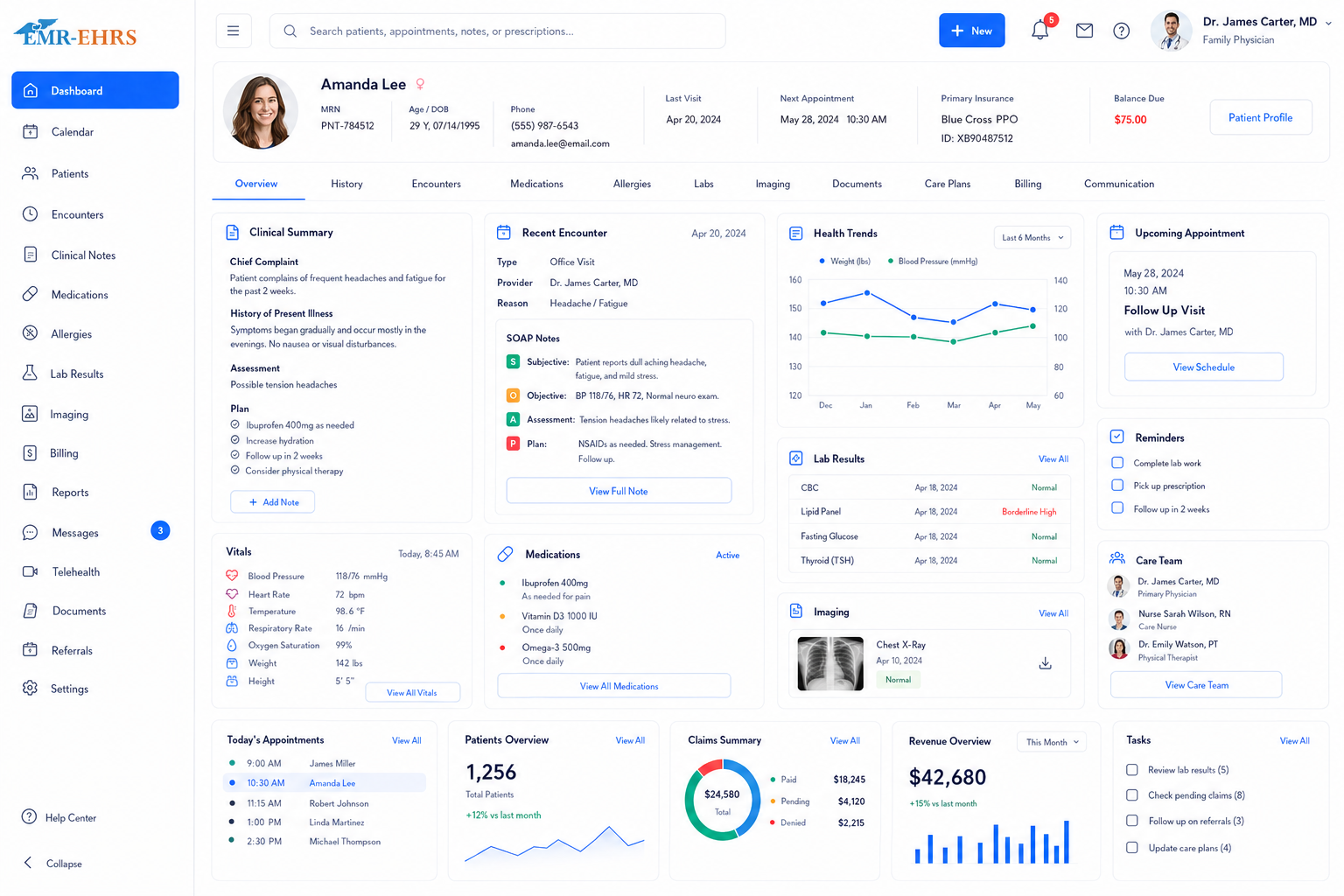
This conceptual workflow preview illustrates a EMR dashboard mockup.
Patient chart, visit notes and timelines.
Orders, results, documents and follow-ups.
Scheduling, check-in, portal and billing connections.
AI chart summary where available.
EMR-EHRs helps practices manage patient charts, histories, documents, notes, medications, allergies, vitals, and clinical workflows where supported.
EMR-EHRs can support templates, visit notes, specialty documentation, provider workflows, and secure chart history where available.
EMR-EHRs connects clinical workflows with scheduling, billing, claims, reports, and patient communication where supported.
EMR-EHRs can support patient portal workflows, forms, reminders, communication, and patient access features where available.
EMR-EHRs supports permission-based chart access, secure patient records, staff activity history, and audit-friendly workflows where supported.
EMR-EHRs can support chart summaries, documentation assistance, task prioritization, and workflow summaries where available.
EMR-EHRs helps configure templates, users, permissions, workflows, reports, and staff training.
Review existing documentation, patient charting, scheduling, billing, forms, documents, reports, and specialty workflows.
Configure demographics, medical history, allergies, medications, problems, vitals, documents, and chart summary fields.
Configure visit note templates, specialty templates where supported, note workflows, provider signatures, and documentation rules.
Configure appointment workflows, check-in/check-out, intake forms, patient demographics, and eligibility workflows where supported.
Configure preferred pharmacies, medication workflows, refill workflows, medication alerts, and ePrescribing where supported.
Configure lab workflows, imaging workflows, result review tasks, document categories, and attachment workflows where supported.
Configure diagnosis connection, charge entry, CPT/HCPCS workflows, pre-claim checks, claims connection, and billing readiness where supported.
Configure portal access, patient forms, secure messaging, appointment reminders, statements, and patient record access where supported.
Configure clinical reports, operational reports, billing reports, provider productivity reports, and practice dashboards.
Configure provider access, staff access, billing permissions, admin permissions, role-based chart access, and audit-friendly activity.
Configure AI chart summaries, documentation assistance, report summaries, task prioritization, and workflow support where available.
Train providers, clinical staff, front desk teams, billing teams, practice managers, administrators, and specialty teams.
Monitor charting adoption, documentation completion, scheduling flow, billing readiness, report accuracy, and workflow efficiency.
Electronic medical records software is a digital system used to create, store, update, and manage patient medical records. EMR-EHRs Electronic Medical Records Software can help practices manage patient charts, clinical notes, demographics, medical history, medications, allergies, vitals, documents, scheduling, billing, reports, and secure record access where supported.
EMR-EHRs helps practices organize patient records in one digital chart where supported, including demographics, contact details, insurance information, medical history, problem lists, medications, allergies, vitals, visit notes, scanned documents, attachments, chart history, and secure role-based access.
Practices should look for EMR software with digital patient charts, clinical documentation, visit notes, templates, medication and allergy tracking, vitals, document management, ePrescribing where supported, patient portal where supported, scheduling, billing connection, reports, secure access, AI support where available, and implementation training.
Yes, where supported. EMR-EHRs can connect clinical documentation with diagnosis details, CPT/HCPCS workflows, procedure code billing, coding advisor tools, pre-claim checks, electronic claims, payment posting, patient collections, billing readiness, claim readiness, and reporting.
Practices should use EMR software because paper charts can slow chart access, documentation, billing handoffs, reporting, and patient record organization. EMR-EHRs Electronic Medical Records Software supports digital patient charts, secure access, documentation history, connected workflows, reports, and better visibility across clinical and administrative tasks where supported.
Manage patient charts, clinical documentation, medications, allergies, vitals, documents, scheduling, billing, reports, secure access, and AI-supported workflows with EMR-EHRs Electronic Medical Records Software where supported.
Phone: (480) 782-1116 | Email: [email protected]
Customer Experiences
Read customer feedback about EMR implementation, practice management workflows, billing, training, support, documentation, scheduling, and daily medical office operations.
Read full testimonialHello my name is Sarah and I wanted to take a minute and tell you about my experience implementing a Podiatry EMR program. We researched for about 18 months and in doing so looked at over 20 different EMR programs. We recently went live with IMS through 1st Providers Choice and were completely thrilled that during the first two months of the transition of going paperless, we showed an increase in productivity even during training and the implementation process. The more we are in the software, the more we find that it has so many capabilities to be efficient for my doctors, my billing coordinator, and the front desk. Support has been good, there were a few occasions where we needed things off business hours, and even then 1st Providers Choice was there for us. We were glad we took our time and looked at several programs before making a decision.
Read full testimonialWe began implementing IMS in our office in April of 2011. This transition was made exceptionally easy with the help of 1st Providers Choice support staff. 1st Providers Choice support staff was quick to respond to all of our support needs during implementation and with any of our current support needs. We were uncertain and a little skeptical about bringing the billing in house because I had never done billing before. Our office was able to bring billing in house during this time of implementing IMS and our revenue is up and our turnaround time is quicker than ever before. We are happy that we decided to go with 1st Providers Choice and made the transition to utilizing IMS for Podiatry.
Read full testimonialChoosing 1st Providers Choice as a business partner has been an excellent choice for our office. We received extensive training from the educational team and find the program to be very user friendly. Scheduling is easy and our billing process has been greatly expedited. The EHR part of the program is easy to work, saves time and helps prevent errors. We have successfully implemented the built-in fax and camera features. 1st Providers Choice is a progressive company that keeps up-to-date on laws and changes and offers excellent support. Thanks, 1st Providers Choice, for helping our office run more efficiently. We really like this program.
Read full testimonialMy bad-debt write-offs have been reduced over 90%. Pre-IMS, we had an average of $80,000 per month outstanding in charges waiting for referral. Since implementation of IMS we now regularly maintain no more than $400 per month. The Authorization tracking screen helps us in timely follow-up with the insurance companies. The billing module is great, in a way we now know what ensures timely payments. The aging reports help our billers set priority of follow-ups, making sure we work in the right areas.
Read full testimonialI just wanted to say that I love IMS!!! We have had other programs in the past but IMS is super!!!! I can bill out charges, enter patient demographics, print patient statements and read the patient ledger much easier. My favorite part of IMS is the billing part. It is so easy to read!!!! Makes my job easier!!!! Thank You!!!
Read full testimonialIMS has improved the billing payment turnaround time. The denied claims have been reduced drastically. The implementation process was smooth and the system is very user friendly.